Skip to content
NewNexus 2.0 is here, and it’s open source. Read the launch post

Changelog

The bigger things we shipped, with a picture of each. Small fixes go out every day and aren’t listed here.

  1. Cloud agents

    Pick Cloud when you start a session and the agent gets its own Linux machine instead of your laptop. Close the lid, go to lunch, and it keeps working. Come back and the session is where it left off.

    Every session gets a machine of its own, so two agents never step on each other. A machine sleeps when it has nothing to do and wakes when you send the next message. If a job runs out of memory, it starts again on a bigger one.

    To set it up, open Settings › Cloud, add your Claude setup token and sign in to GitHub. The machine time is billed to your organization, under the same budgets as everything else.

    Cloud sessions run on machines we rent for you, so they are not end-to-end encrypted. Nexus does not look at them. Sessions on your laptop are the ones that stay end-to-end encrypted.

    Cloud agents →

  2. Nexus for macOS, Windows and Linux

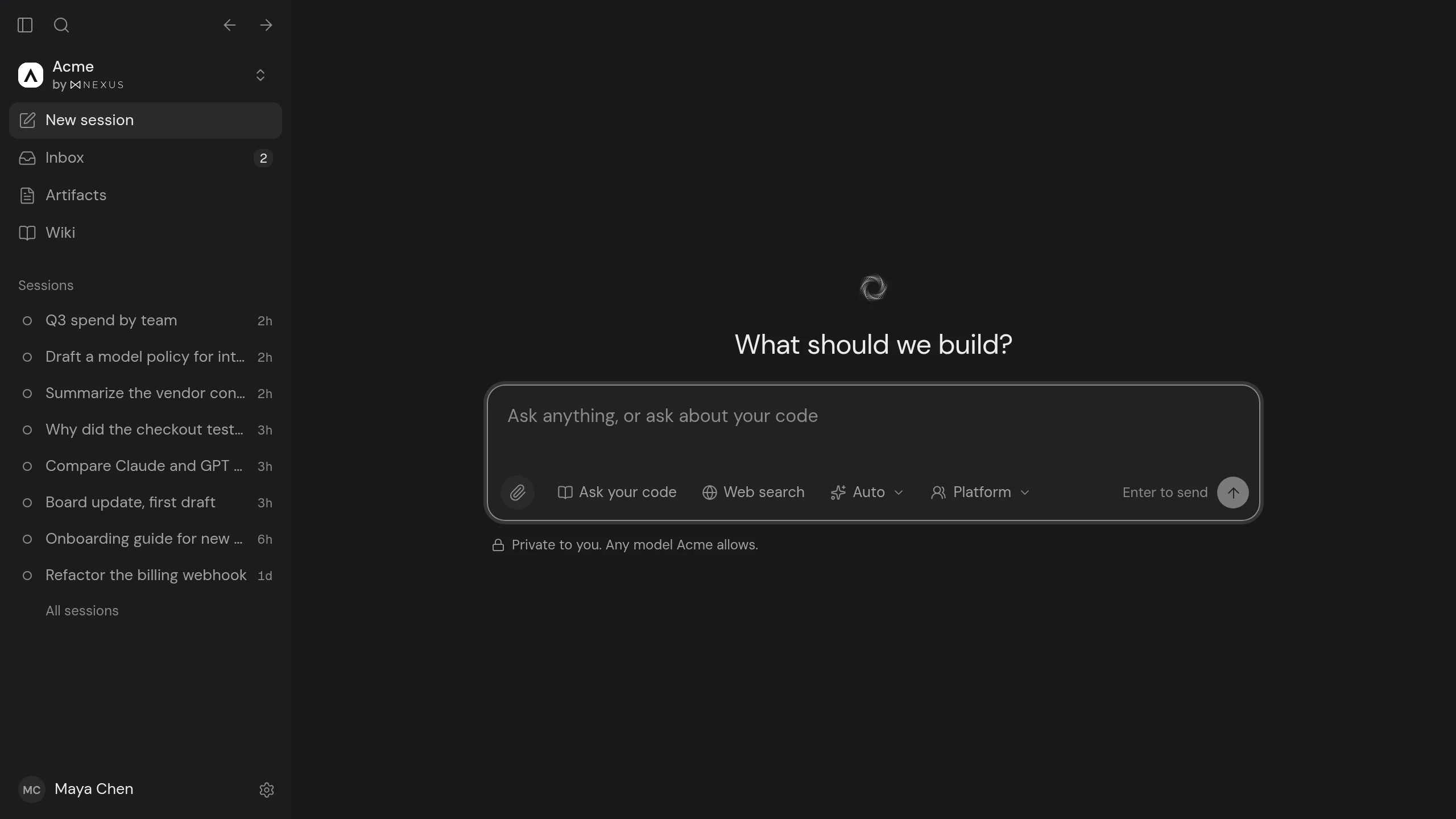
    The Nexus desktop app: Acme’s workspace, with sessions in the sidebar and an empty composer

    The desktop app is out for everyone. Until now it was something we used ourselves. Now there are stable builds for macOS, Windows and Linux, ready to download.

    On Windows you get a regular installer. On Linux there is an AppImage, a .deb and an .rpm. Sign in with your Nexus account and your sessions, models and budgets are the ones you already have.

    • Feedback from the app. Tell us what broke without leaving Nexus. After a crash, the app asks once whether to send us the report.

    Download Nexus →

  3. A browser next to every session

    Each session now has a browser on the right. When the agent starts a dev server, the page opens there, so you see the change while you read about it.

    The agent can use the browser too. It clicks through the page, fills in forms and checks that its fix works. You can take over at any moment and hand control back when you are done. If a site needs you signed in, import the sign-in from the browser you already use.

    • Terminals and files. The same panel has terminals for the session and a file viewer. ⌘P finds any file in the repo.
    • Agents that keep working. Sessions keep running after you quit Nexus, and you can schedule a session or start one from a webhook.
  4. Agents that run other agents

    A session can now start other sessions. Ask for a large change and the agent splits it up, hands each part to a session of its own, waits for them and brings the results back together.

    The Crew tab shows every agent in the group, what each one is doing and what it has spent. Stop one, or the whole crew, at any time. A spending cap pauses the crew before it costs more than you meant it to.

  5. Nexus in your terminal

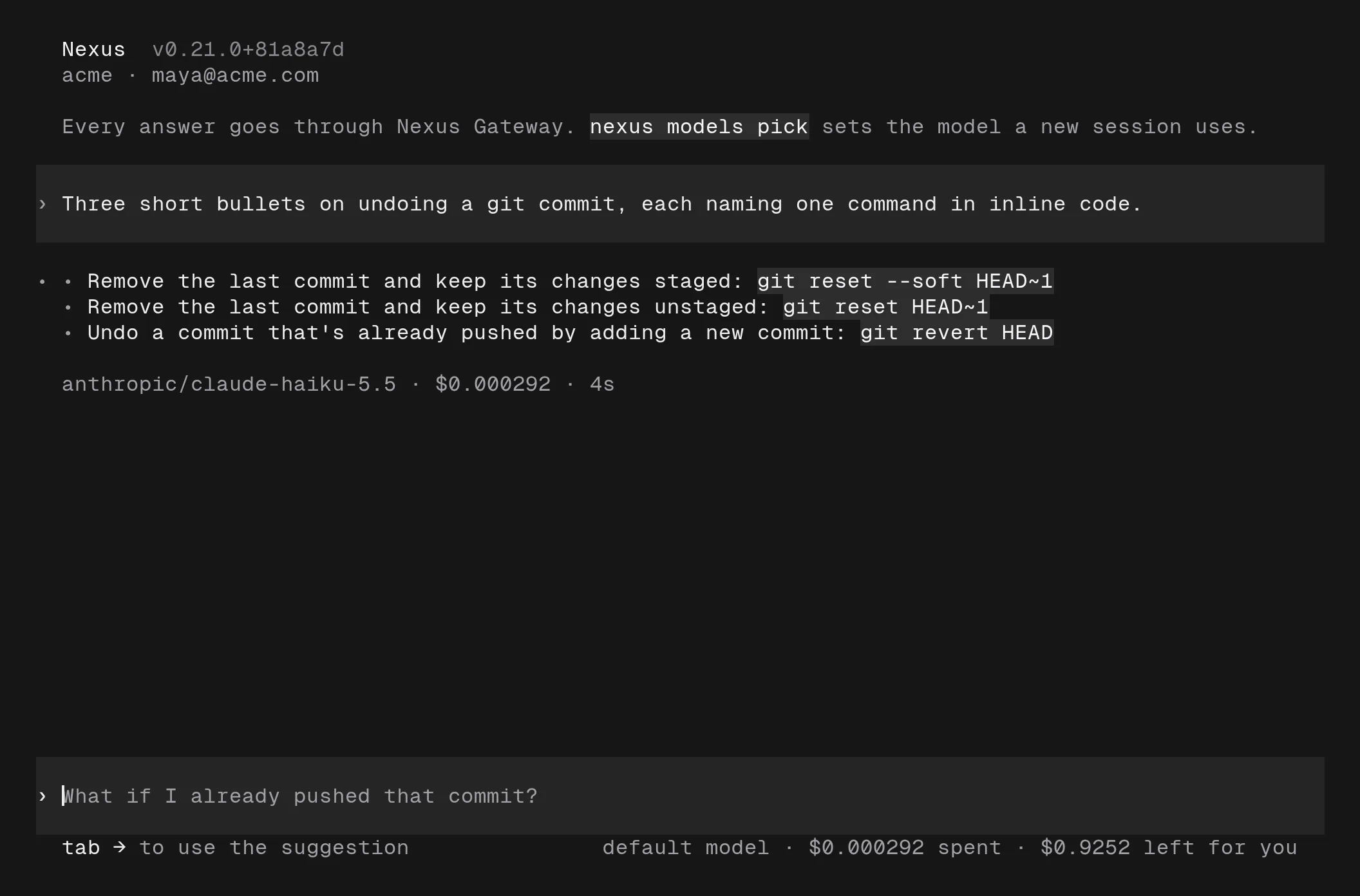
    The Nexus CLI in a terminal: a question, its answer, and the model and cost it ran on

    Type nexus in any terminal and you are in a session, with the model and the cost under every answer. nexus claude and nexus codex start Claude Code and Codex through your organization’s gateway, with the same models, keys and budgets as the app.

    nexus mcp gives any agent the Nexus tools, and nexus sessions starts and follows desktop sessions from a script.

    CLI and API →

  6. Review pull requests in Nexus

    Paste a pull request link when you start a session and Nexus checks it out in a separate worktree, away from your own changes. Ask the agent what it does, where it could break, or to fix what you found.

    Comment on any line of the diff and send the comments to the agent. When an agent opens a pull request itself, it can watch it and pick the work back up when a check fails or a reviewer leaves a comment.

  7. Claude Code and Codex, in the desktop app

    The desktop app now runs coding agents on your own repositories. Start a session, pick Claude Code or Codex, and it works in a git worktree of its own, so you can run several at once on the same repo.

    You see what changed after every turn and for the whole session, and you open the pull request from the same screen. Every call goes through your organization’s gateway, on your keys and inside your budgets.

    Desktop app →

  8. Ask Nexus from the menu bar

    Press ⌥ Space anywhere on your Mac and a small panel opens. Ask your question, read the answer as it streams in, and get back to what you were doing.

    The menu also shows the sessions that need you and the ones still running. Record your screen from the same menu to show an agent the problem instead of describing it.

    Mac widget →