

Auto Router v1.5
Auto sends more everyday requests to lower-cost models. On our benchmark, v1.5 bills 68% less per answer than v1.4.
The Nexus team
Set model to nexus/auto, and Auto picks a model for each request. Auto Router v1.5 is live. It sends more everyday
requests to lower-cost models, and on our benchmark it bills 68% less per answer than v1.4.
curl -i https://api.nexus.inc/v1/chat/completions \
  -H "Authorization: Bearer $NEXUS_API_KEY" \
  -H "Content-Type: application/json" \
  -d '{"model": "nexus/auto", "messages": [{"role": "user", "content": "Rename getUserName to snake_case"}]}'
The x-nexus-model header names the model that ran. The x-nexus-router header names the Auto version that picked
it.
What's new
- Lower-cost models for coding questions (v1.5). A code block no longer sends a request to a stronger model by itself. The request's size and shape decide. Requests with tool results, like an agent's loop, still go to a stronger model.
- Prices based on real answers (v1.3.1 and v1.4). Some models write longer answers than others, and reasoning is billed as output. Auto now prices each model by how much it writes per answer, measured on our benchmark.
- Open-weight models for light requests (v1.3). gpt-oss-120b and GLM 5.3 Flash on Baseten can now take light requests.
How Auto picks a model
- It starts from the models you allow. Auto considers only the models your organization's policy allows and can pay for.
- It sorts the request. Auto scores the request's size, turns, tools, tool results, code and images. Then it puts the request in one of three classes: light, standard or heavy. Most short questions are light. A request with tool results is standard or heavy.
- It picks the lowest-priced model for the class. Each class has a minimum model tier. Auto prices each model at or above that tier by how much it writes per answer, and sends the request to the lowest-priced one.
- It records the pick. Every pick is recorded with its version and its class. If Auto cannot pick, the call runs your organization's default model.
Benchmark
We sent 222 light and standard prompts through the Gateway to five models: Claude Haiku 5.5, Claude Sonnet 5.5, GPT-6 Luna, gpt-oss-120b and GLM 5.3 Flash. We graded every answer. Then we replayed each Auto version's picks on those answers. Costs are what the Gateway billed, weighted by our own traffic: 85% light, 15% standard.
| Model | Light prompts passed | Standard prompts passed | Cost per 1,000 answers |
|---|---|---|---|
| Claude Sonnet 5.5 on every request | 94 of 110 | 98 of 112 | $2.33 |
| Auto v1.4 | 90 of 110 | 90 of 112 | $0.86 |
| Auto v1.5 | 92 of 110 | 88 of 112 | $0.28 |
Against v1.4, v1.5 bills 68% less per answer. Its pass rates moved by no more than chance: two more light passes, two fewer standard passes.
Against Claude Sonnet 5.5 on every request, v1.5 bills 88% less. It passes two fewer light prompts and ten fewer standard prompts. If your standard requests need Sonnet-level answers, name the model in those calls.
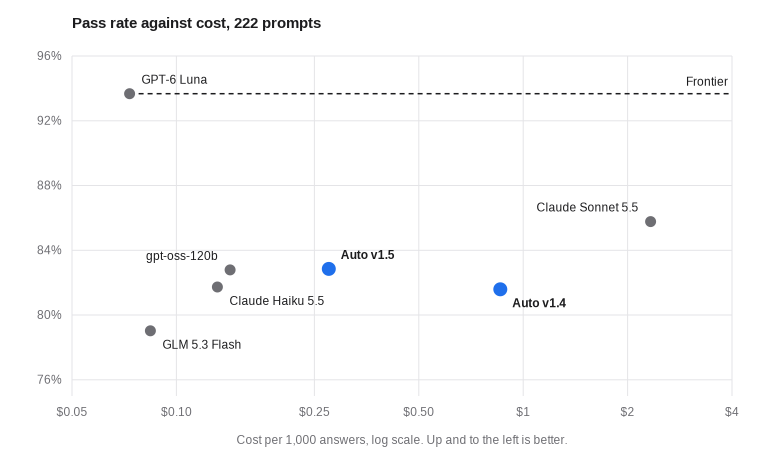
The chart puts each Auto version next to five models used on every request. Up and to the left is better. A point is on the frontier when no lower-cost point passes more prompts.
Auto v1.5 is not on the frontier. GPT-6 Luna on every request passed 93.7% of the prompts at $0.07 per 1,000 answers. Auto v1.5 passed 82.9% at $0.28. Two things explain most of the gap:
- Auto sends standard requests only to models in a stronger tier, and GPT-6 Luna is not in it. On this benchmark, GPT-6 Luna passed 94 of 112 standard prompts. Auto v1.5 passed 88.
- Most of these prompts are light, and GPT-6 Luna passed 105 of 110 of them. A set this easy does not show where a stronger model is worth its price.
Closing this gap is the next step for Auto: a fuller benchmark, with heavy prompts, and tiers set from its results. We will publish the same chart with each new version.
The benchmark has no heavy prompts, and it is one run on our own prompts. So these numbers say nothing about heavy requests.
Get started
- Set
modeltonexus/autoin an API call, or pick Auto in the model picker. - Block a model in your model policy, and Auto stops picking it.
- See every Auto version in the Auto Router changelog.